Smartphone Simulations
Classroom Usage Framework
 We advocate that usage directions to students be given upon a single projected powerpoint slide that contains ...
- a descriptive title like "Star Trails Explorer Directions"
- a QR code to the simulation — students will get to the simulation very quickly with this method
- the actual URL to the simulation — a few students will be using laptops and will need to type this
- a small screen shot of the simulation —gives students confidence that they have arrived at the right place
- very brief directions: "Work out answers in your group to Q1 A through D. We will debrief in 10 minutes."
An example appropriate for a first usage is shown. A simple PhET simulation used in a similar manner can be found here.
Eclipse Explorer

(updated 6/24/2021) This is a multi-faceted collection of simulations allowing students to explore eclipses from a number of perspectives. There are 5 simulation components:
- Labeled Shadow Diagram — Regions of shadow around an object can be viewed on an adjustable screen or by a movable eye.
- Freestyle Shadow Diagram* — Regions of shadow around two adjustable objects are shown.
- Earth-Moon Top View — Allows the range of distances and angular diameters to be explored for both solar and lunar eclipses.
- Earth-Moon Side View* — Allows a viewer from the sun's perspective to observe the Earth-Moon system and explore eclipse seasons on a timeline.
- Eclipse Table* — Illustrates the frequency of lunar and solar eclipses from 2000 to 2100 with links to NASA Goddard resources.
Components that build upon a simulation that is present in the ClassAction project are marked with an asterisk.
Funding for the development of the Eclipse Explorer was obtained from the NASA Nebraska Space Grant.
grab the Eclipse Explorer QR Code
Planetary Positions Explorer
 (updated 11/12/2021) This simulation provides two views of the inner 6 planets: 1) a top-down view of the solar system showing the orbital motions of the planets, and 2) a horizon view showing the positions of the other planets and the sun on the celestial equator. The two views can be shown individually or simultaneouslly. Questions to guide the exploration are incorporated.
Partial funding for development of the Planetary Positions Explorer was received from the American Astronomical Society and we acknowledge the work of their Education Committee.
Launch Planetary Positions Explorer!
grab the Planetary Positions Explorer QR Code
Star Trails Explorer
 (updated 11/16/2021)This simulation illustrates two views of star motions: 1) a celestial sphere representation where latitude (and the positions of the poles) can be specified, and 2) the view of the observer looking in any of the cardinal directions. It can be used to explore the locations of celestial poles in the sky as a function of latitude and the angle that star trails make with the horizon. Questions to guide the exploration are incorporated.
grab the Star Trails Explorer QR Code
Coordinate Switch (between Celestial Equatorial and Horizon Coordinates)
 (updated 1/26/2022) A modest simulation applying a horizon plane at any latitude on Earth and forming a horizon coordinate system. It illustrates the locations of the celestial poles in the sky for this location facilitating understanding of the apparent motion of sky objects. It can precede and be used in conjunction with the usage of any horizon system simulation such as the Star Trails Explorer or the Planetary Positions Explorer.
grab the Coordinate Switch QR Code
Lunar Phases HTML5 Simulations
The simulations below were developed in collaboration with WGBH Boston for their Bringing the Universe to America's Classrooms collection with funding from NASA.
Simulation #1: Moon Phases Viewed from Earth
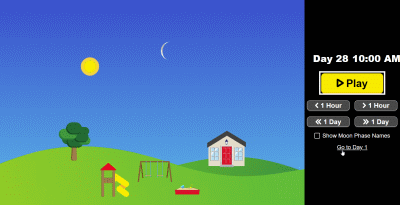
A simulation illustrating the motion of the sun and the moon in the southern sky for a mid-latitude in the northern hemisphere. Launch Simulation! It is useful for teaching that the sun can be seen only during the day and the moon can be seen either during the day or at night. It also shows the varying illumination on the lunar surface and the names of the phases.
It is targeted at grades K-2 students. Grab the Simulation #1 QR Code.
Links to this simulation and related materials on the PBS Learning Media web site:
- Simulation
- Lesson Plan (coming soon)
Simulation #2: Moon Phases Viewed from Earth and Space
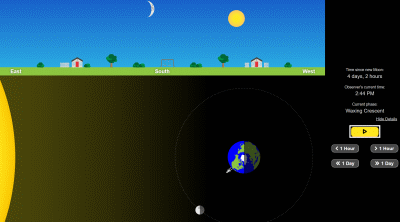
A simulation simultaneously illustrating the sky view (the sun and moon in the sky as seen from Earth) as well as the space view (the sun, Earth, and the orbiting moon in space).
Launch Simulation!It illustrates how the geometry of the sun, the moon, and Earth gives rise to lunar phases.
It is targeted at grades 3-5 students. Grab the Simulation #2 QR Code.
Links to this simulation and related materials on the PBS Learning Media web site:
Simulation #3: Exploring the Rising and Setting Times of Moon Phases
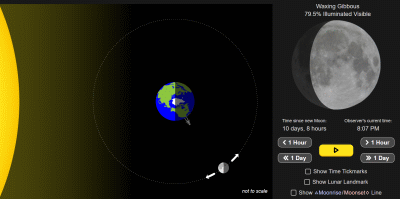
A third simulation illustrating the space view of the sun-Earth-moon sytem and the appearance of the moon from Earth. Launch Simulation! It allows one to estimate the rising and setting times of a lunar phase as well as discuss the synchronous rotation of the moon.
This third simulation is targeted at grades 6-8 students. Grab the Simulation #3 QR Code.
Links to this simulation and related materials on the PBS Learning Media web site:
- Simulation
- Lesson Plan (coming soon)
Disclosure: Kevin M. Lee, curator of this web site, has disclosed a significant financial interest in Pivot Interactives. In accordance with its Conflict of Interest policy, the University of Nebraska-Lincoln’s Conflict of Interest in Research Committee has determined that this must be disclosed.